days to autopilot
On average. Depending on person and habit it took 18 to 254 days. A single missed day made no measurable difference.
Lally et al. 2010 · European Journal of Social PsychologyHabit tracker for iPhone and Apple Watch
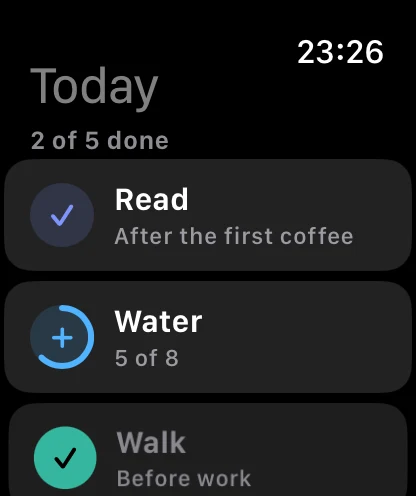
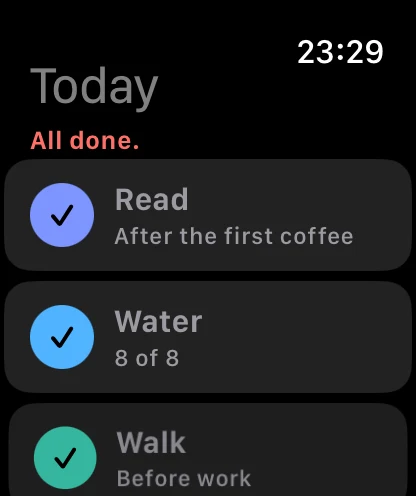
Dotpilot shows you when a habit has stuck and you no longer have to think about it. Checking off takes a second, on your iPhone, your wrist or a widget.
Free with three habits · Pro is a one-time purchase · no subscription

Autopilot
On average it takes 66 days for a habit to become automatic. Dotpilot tracks how far along each habit is and tells you how many weeks are left.

Skips
A single miss costs your autopilot nothing. For your streak you get two skips a week. And if you only forgot to check off yesterday, one tap in the morning fills it in.

Anchor
Habits stick better when they hang on something you already do every day. In Dotpilot every habit gets such a moment, and Today sorts itself around them.

Review
Dotpilot sums up your week, month and year in plain sentences: “Done 300 times.” The year grid shows all habits in one picture, and at year’s end you get your year as a story to share.

Apple Watch and widgets
One tap on your watch or in a widget is enough. Dotpilot doesn’t need to be open.

Features
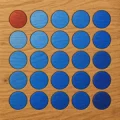
Bricks, neon, wood, embroidery and six more. The red dot is always there.









The right sign for every habit. Search knows keywords too: “jog” finds Run.
Export your data from your old app as a table and import it here. Dotpilot figures out columns and date formats by itself.
Your data stays on your iPhone and, if you like, in your private iCloud. I never see any of it.
Anytime as a backup file or as a table for Numbers and Excel.
English, German, Spanish, French, Italian, Dutch, Polish, Portuguese, Japanese, Korean and Chinese.
No red numbers, no guilt trips. The better a habit has stuck, the less the app speaks up.
Science
The app shows which study is behind which rule.
On average. Depending on person and habit it took 18 to 254 days. A single missed day made no measurable difference.
Lally et al. 2010 · European Journal of Social PsychologyGoals with a little slack are reached more often than rigid ones.
Sharif & Shu 2017 · Journal of Marketing ResearchAn if-then plan carries a habit better than an alarm.
Stawarz et al. 2015 · CHI; Gollwitzer & Sheeran 2006For exercise, the habit formed from about four sessions a week. Plan fewer and the app tells you when you set it up.
Kaushal & Rhodes 2015 · Journal of Behavioral MedicineDotpilot Pro
Without Pro you get three habits with everything it takes to stick with them: autopilot, skips, filling in, all three views and the weekly review. No ads, no time limit.
Quick answers
Yes. Your streak is the second number next to the autopilot, and two skips a week keep it alive. The big number is still the autopilot: it doesn’t drop to zero after one missed day. A streak does.
Nothing, as long as three habits are enough for you. Dotpilot Pro is a one-time purchase that unlocks everything. There is no subscription.
On your iPhone. With Pro you can sync it between your devices through your private iCloud. Dotpilot has no server of its own and no account, and I receive no data from you.
Yes. Under Settings → Backup and export you import a table (CSV). Dotpilot understands one row per habit and day or one column per habit, shows you what it found first, and leaves what’s already there as it is.
No. The watch is an extra in Pro. Dotpilot works fully on the iPhone.
No. Dotpilot is only available for iPhone and Apple Watch.
iOS 27 on iPhone and watchOS 26 on Apple Watch.

Download it for free and set up your first habit. It takes less than a minute.